Email signature analytics
See which links, banners and social icons in your team's signatures people actually click. Firma filters out the clicks security scanners make, so you see real engagement, not noise.
- Clicks on every link, icon, button and banner, tracked automatically
- Security scanner and preview clicks filtered out by default
- Works on Gmail (Google Workspace) and Outlook (Microsoft 365)
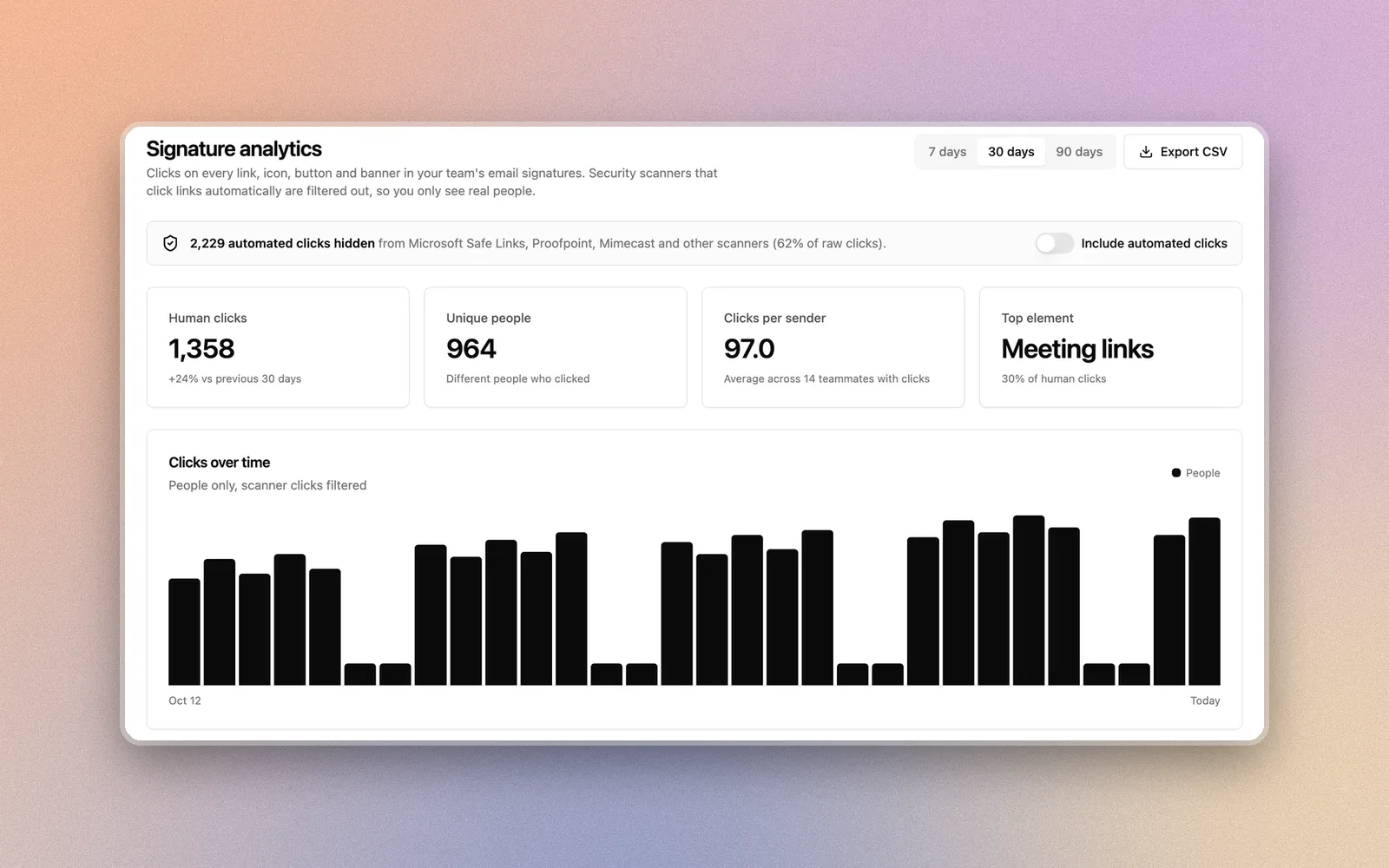
Most signature click counts are inflated
Before an email reaches the inbox, security tools like Microsoft Safe Links, Proofpoint and Mimecast often open every link in it to check for threats. A tool that counts every hit reports those scans as clicks, and the scans can outnumber real people.
Firma checks each click for scanner signatures, link previews and bursts of automated hits on the same signature. Those are hidden by default and shown as a separate number, so you can trust the count and still see the raw total when you want it.
Know what your signatures actually do
Only real people are counted
Security scanners like Microsoft Safe Links, Proofpoint and Mimecast open every link in an email to check it. Firma flags those clicks and hides them by default, so the numbers reflect people.
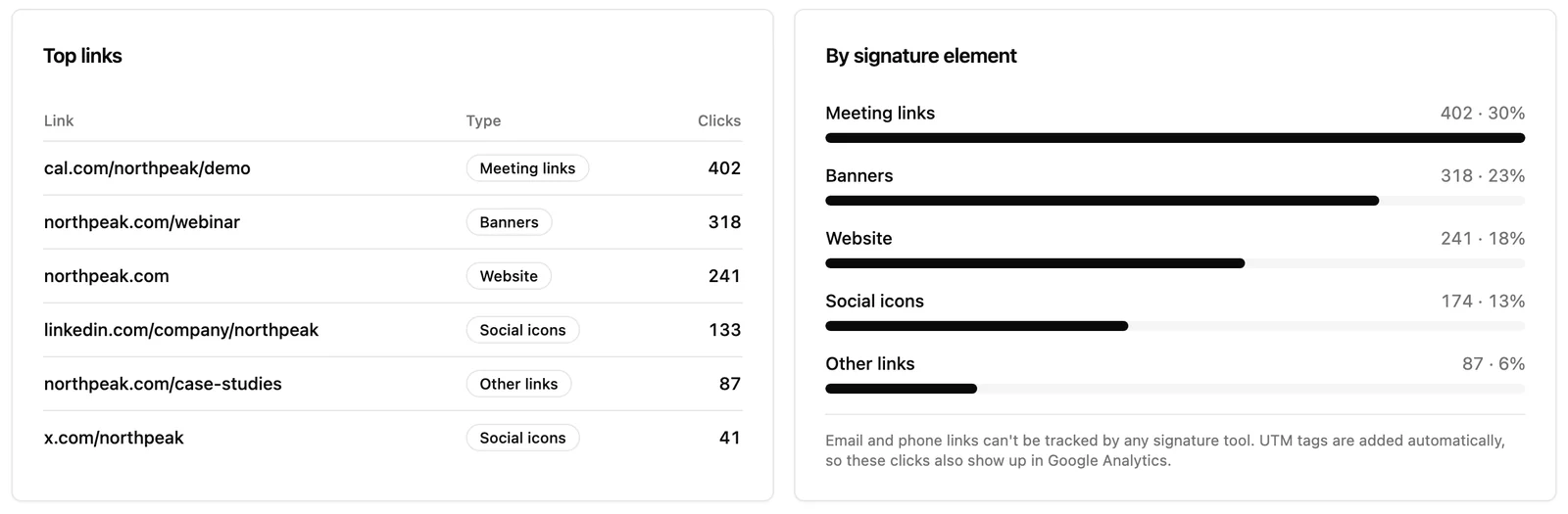
Every link, icon, button and banner
Website, meeting links, social icons, buttons and campaign banners are all tracked automatically. Nothing to tag by hand.
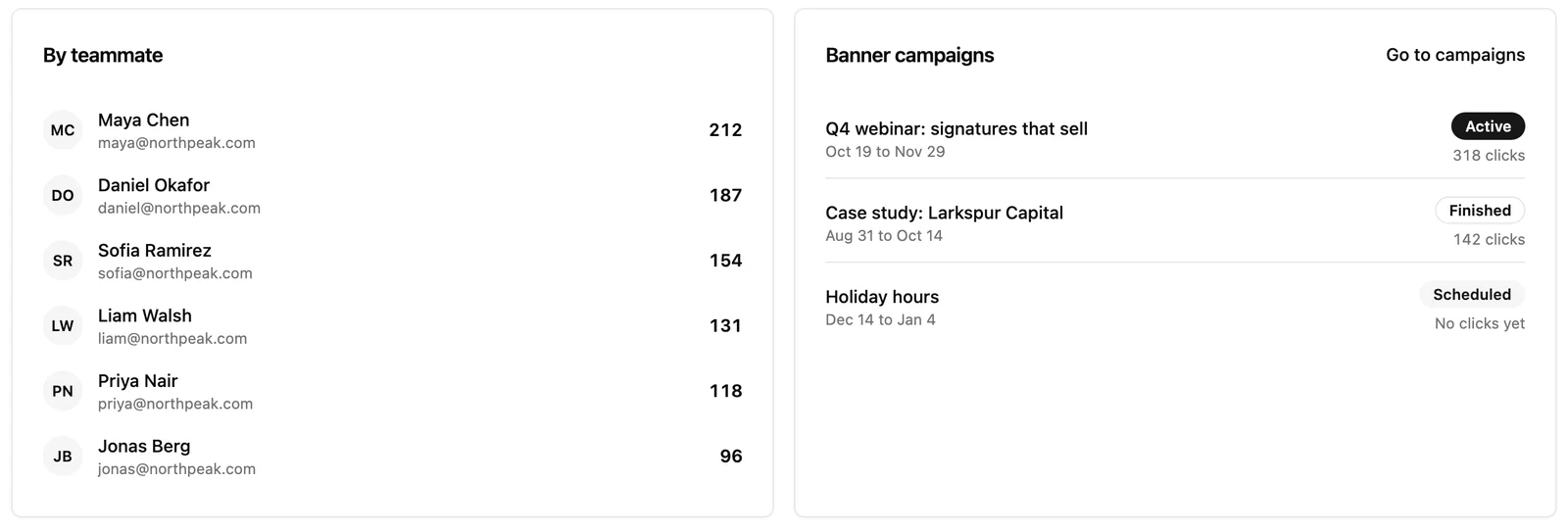
See which teammate drives clicks
Compare clicks by teammate to see whose emails get engagement, and which signatures could use a better call to action.
Measure banner campaigns
Each banner campaign shows its own clicks, so you can tell which offer, webinar or case study people actually open.
Shows up in Google Analytics too
UTM tags are added to your own links automatically (utm_source=email_signature), so signature traffic is credited correctly on your site.
Private by design
Recipient IP addresses are never stored, only a one-way hash used to filter duplicates. Click records are deleted after 13 months.
See what works, link by link
Top links, clicks by signature element, by teammate and by banner campaign, for the last 7, 30 or 90 days.
How signature click tracking works
Tracking is on by default
Firma turns each link in a team signature into a short tracking link. Email and phone links are left as they are. You can switch it off in Settings at any time.
Recipients click as usual
They land on the same page as before. Firma records the click, filters out scanners and previews, and adds UTM tags to your own links.
Read it in Analytics
Open Analytics to see human clicks over time, top links, clicks by element and by teammate, and how each banner campaign performs.
Frequently asked questions
Related features
- Email signature campaigns Schedule banners by team, then measure them here.
- How to track email signature clicks UTM tags vs tracked links, step by step, for Gmail and Outlook.
- Automatic signature rules Give each department the right signature and call to action.
- Email signature management Manage every signature from one dashboard.
Find out which signature links people click
Set up in minutes. Free plan available. No credit card required.